> For the complete documentation index, see [llms.txt](https://docs.totlelab.com/llms.txt). Markdown versions of documentation pages are available by appending `.md` to page URLs; this page is available as [Markdown](https://docs.totlelab.com/biz-ent/admin-page/greater-than-10.md).
# 대용량 첨부 > 기본 설정
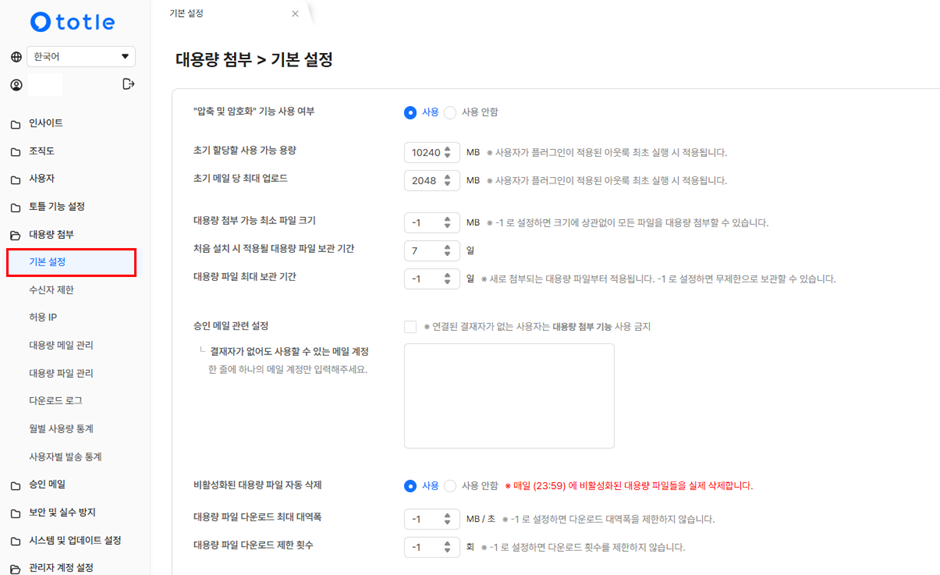
관리자가 대용량 첨부 기능에 대한 사용자 설정을 진행할 수 있습니다.
* **대용량 첨부 가능 최소 파일 크기**를 **설정**하여 **대용량 파일**이 **외부**로 **유출**되는 것을 **막을 수 있습니다.**
* **대용량 파일 최대 보관 기간**을 **-1**로 설정할 경우 **파일을 무제한으로 보관**할 수 있으나 **제공 용량을 계속해서 차지**합니다. 만약 무제한으로 설정 후 **파일**을 **삭제**하고 싶으신 경우에는 **아웃룩 > 토틀 > 파일함**에서 불필요한 파일을 삭제해서 다시 제공 용량을 확보할 수 있습니다.
* "비활성화된 대용량 파일 자동 삭제" 기능은 엔터프라이즈 플랜에서 사용하실 수 있는 기능입니다.